
Daocheng Forex MT4 Platform Tutorial
In common financial trading software, MT4 has attracted much attention for its comprehensive functionality. For example, through DaochengForex PlatformYou can use MT4 for demo trading. Here is an easy way to use MT4.
The advantages of MT4 will not be repeated here. As the most mainstream trading software at present, it provides a variety of functions superior to traditional stock trading tools, including pending orders, locking orders, automatic stop-loss and take-profit, and powerful intelligent trading systems.
The first step is to install
By choosing different installation paths, you can install MT4 software from multiple different brokers without conflicts.
Once installed and logged in, you can start registering for a demo account.
Click "File" on the toolbar in the upper left corner - "Demo Account Application"
Click Next to complete the demo account application. Write down the server, demo account and password of your choice to complete the application.
When logging in in the "File" menu, select the corresponding server, enter your username and password, and check "Save account info".
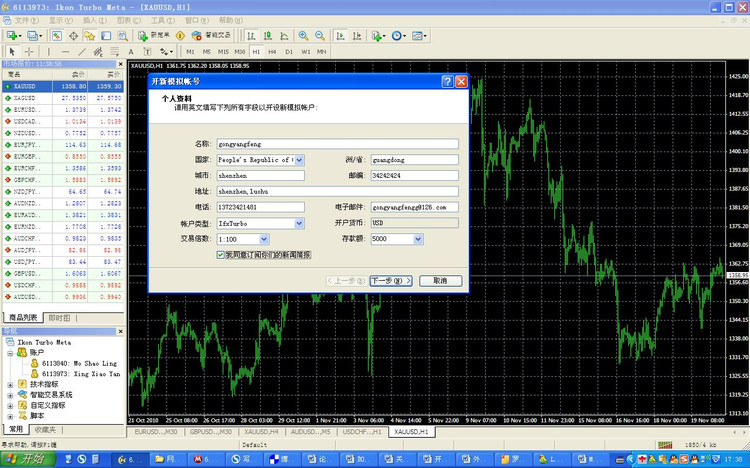
Note that the lower right corner of the picture above shows "1850/4kb", and there are numbers indicating that the server is connected.
If the currency pair widget still shows "Waiting for Update", you can close all widgets waiting for update.
Right-click on the "Market Quote" column on the left and select "Chart Window".
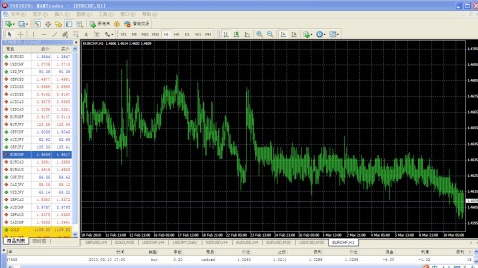
The basic construction of MT4
Program main menu
toolbar
Chart window
'Market quote 'window
'Navigation 'window
'End point 'window
The addition of technical indicators and moving averages in MT4
How to understand the law of price movement? We need to add a moving average. Click "Insert" - "Technical Indicators" - "Moving Average" in the upper left toolbar.
At this moment, I see the following image:
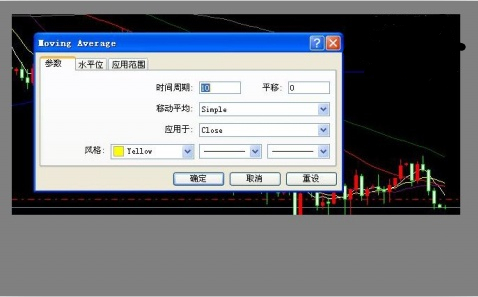
Just set two things: one is "time period", and the other is style and color.
The commonly used cycles are 5 (white), 10 (yellow), 20 (purple), 40 (red), 60 (green), 120 (gray), and 250 (blue).
The above colors are common color schemes for periodic averages. Get in the habit of using fixed color averages to make subsequent analysis clearer.
The moving average is the arithmetic average of the last N K-line closing prices. For example, on the daily chart, MA5 represents the arithmetic average of the last 5-day closing prices; on the 30-minute chart, it represents the average of the last 5 half-hour K-line closing prices.
Insert indicator
For friends who are new to operation, there should not be too many indicators. The three most commonly used are MACD, KDJ, and RSI. The specific usage can be checked by yourself. Insert method: click "insert" - "technical indicator" - "custom", which includes MACD and RSI. It should be noted that KDJ cannot be found in MT4, but "Stochastic" can be found, that is, stochastic oscillator, which is the scientific name of KDJ. At present, most trading software has abandoned the J line and judged by the K line (fast line) and the D line (slow line). Pay attention to this when using it.
Order operation
Right-click on the chart window, select "New Order", and the following window will pop up:
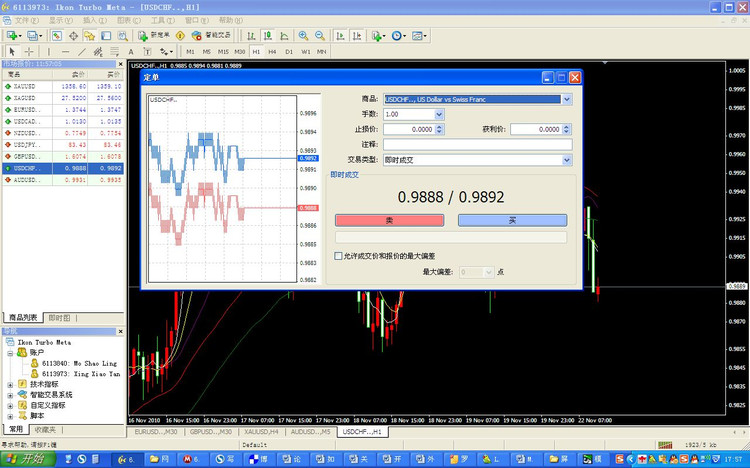
Commodities: corresponding to the corresponding currency pair or precious metals (gold, silver)
Lot size: The minimum trading unit is 0.1
Stop Loss Price: Can be entered manually, reaching this price will automatically stop loss.
Profit price: can be set, reach this position automatically take profit profit exit.
Clicking "sell" means short, and clicking "buy" means bullish.
pending order transaction
In the window above, select "Pending Transaction" in the "Transaction Type" column:
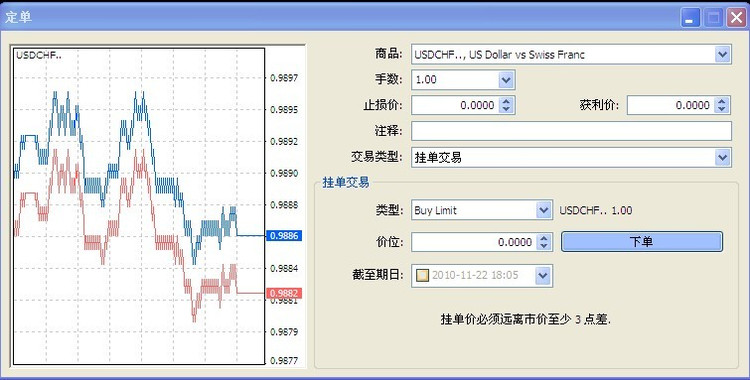
Select "Buy limit" in "Type" and enter the price to indicate buying at a low level.
Select "sell limit" to sell at a high level.
After the setting is completed, the order will automatically enter the market when the target price is reached. When using MT4 through platforms such as Daocheng Forex, these operation processes are basically the same, which can help users get started quickly.
Please indicate the source: https://www.daoctech.com/fxnews/2435.html
Disclaimer: The content of this article does not represent the views of the Institute of Foreign Exchange. The content is for reference only and does not constitute investment advice. Investors operate accordingly at their own risk.