
Depu Capital Foreign Exchange Platform Popular Science: How to Set the Parameters of the Crocodile Line Indicator in the MT4 Platform Software?
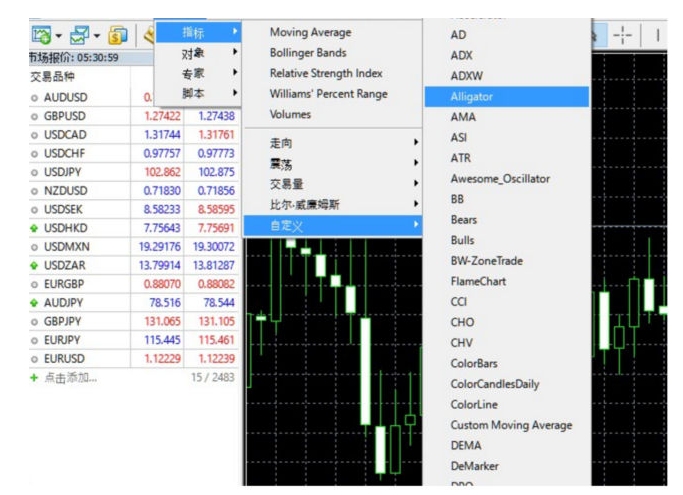
(1) inMT4Select "Insert" → "Indicator" → "Custom" → "Alligator", and then a dialog window will pop up.
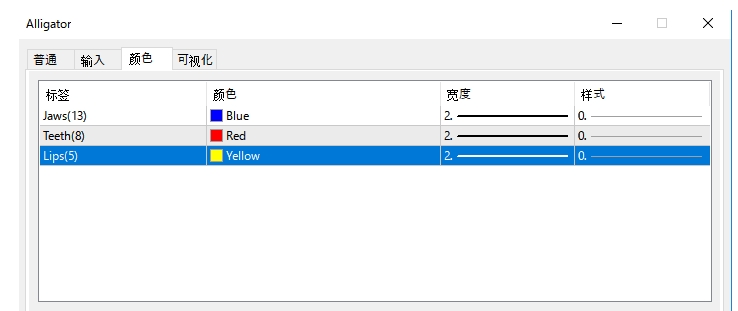
(2) change the color of the crocodile line in the dialog box to, [blue line] represents the crocodile's chin, [red line] represents the crocodile's teeth, and [yellow line] represents the crocodile's lips.
(3) Other parameters can be used with default values. Custom indicators (13,8,5Daily moving average, eachmoving averageThe movement interval is (8,5,3) value interval.
The above is all about how to set the parameters of the alligator line indicator in the MT4 platform software. If you want to know more, you can continue to pay attention to Daocheng Technology.
Please indicate the source: https://www.daoctech.com/fxoutrade/1121.html
Disclaimer: The content of this article does not represent the views of the Institute of Foreign Exchange. The content is for reference only and does not constitute investment advice. Investors operate accordingly at their own risk.