
How to set MACD parameters in MT4 software?
How to set MACD parameters on MT4?
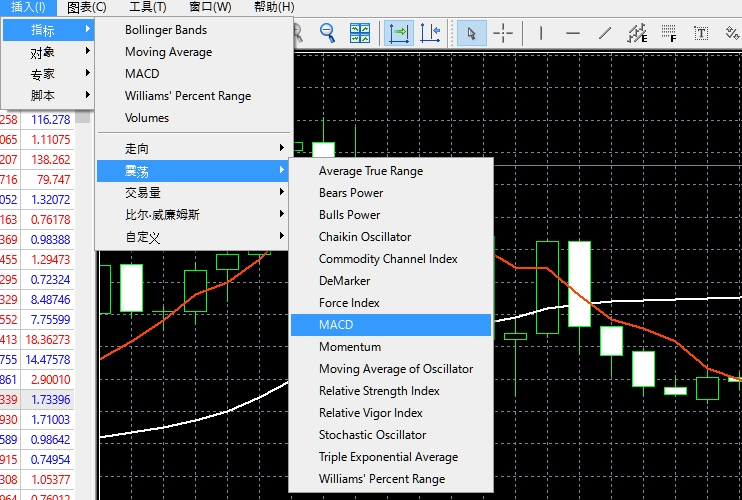
First of all, let's see how to set MACD parameters on MT4? As shown in the picture above, select "Insert" → "Indicator" → "Direction" → "MACD", and then the dialog box will pop up.
(1) Enter "12" in the quick EMA column of the dialog box, enter "26" in the slow EMA column, and enter "9" in the MASD SMA column;
(2) Select "Blue (Aqua) " for the MACD color in the "Main" column, and choose a bold line behind the "Main" column, which is clearer and easier to understand.
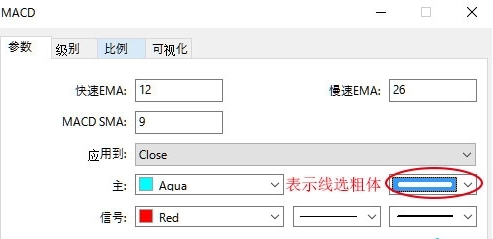
(3) Select "Red" in the "Signal" column, and you can also choose a thicker one for the thickness of the signal, which is clearer and easier to understand.
(4) The indicator parameters are set, as shown in the figure below. The red line is the "signal line", the bar line is the "MACD", and the yellow line is the 0 axis.
Please indicate the source: https://www.daoctech.com/fxnews/1632.html
Disclaimer: The content of this article does not represent the views of the Institute of Foreign Exchange. The content is for reference only and does not constitute investment advice. Investors operate accordingly at their own risk.